
Download SSuite Office Premium HD+ – Free Office Suite, Document Editor, Spreadsheet Tool, Cloud Backup, High-Resolution Support
Overview
SSuite Office Premium HD+ is a comprehensive, free mobile office suite designed to support users in creating, editing, and managing documents and spreadsheets with professional-grade tools. The application addresses common challenges in mobile productivity, such as limited document formatting capabilities, lack of cross-format export options, and the risk of data loss due to device failure or accidental deletion. By integrating a word processor and spreadsheet editor into a single platform, SSuite Office Premium HD+ streamlines workflows for students, freelancers, educators, and remote professionals who require reliable tools on the go.
Its core purpose lies in delivering a desktop-like experience on mobile devices, particularly those equipped with high-resolution displays. The suite supports the creation of complex documents with features like tables of contents, indexes, and bibliographies, while also enabling users to export files in multiple formats including PDF, JPG, PNG, DOC, and ODT. This versatility makes it ideal for academic submissions, business reports, and personal project documentation. The inclusion of automatic cloud backups ensures data integrity and continuity, reducing anxiety over lost work. While the developer did not provide additional technical details, the app’s focus on efficiency and accessibility positions it as a valuable utility in the mobile productivity ecosystem.
Key Features & Functionality
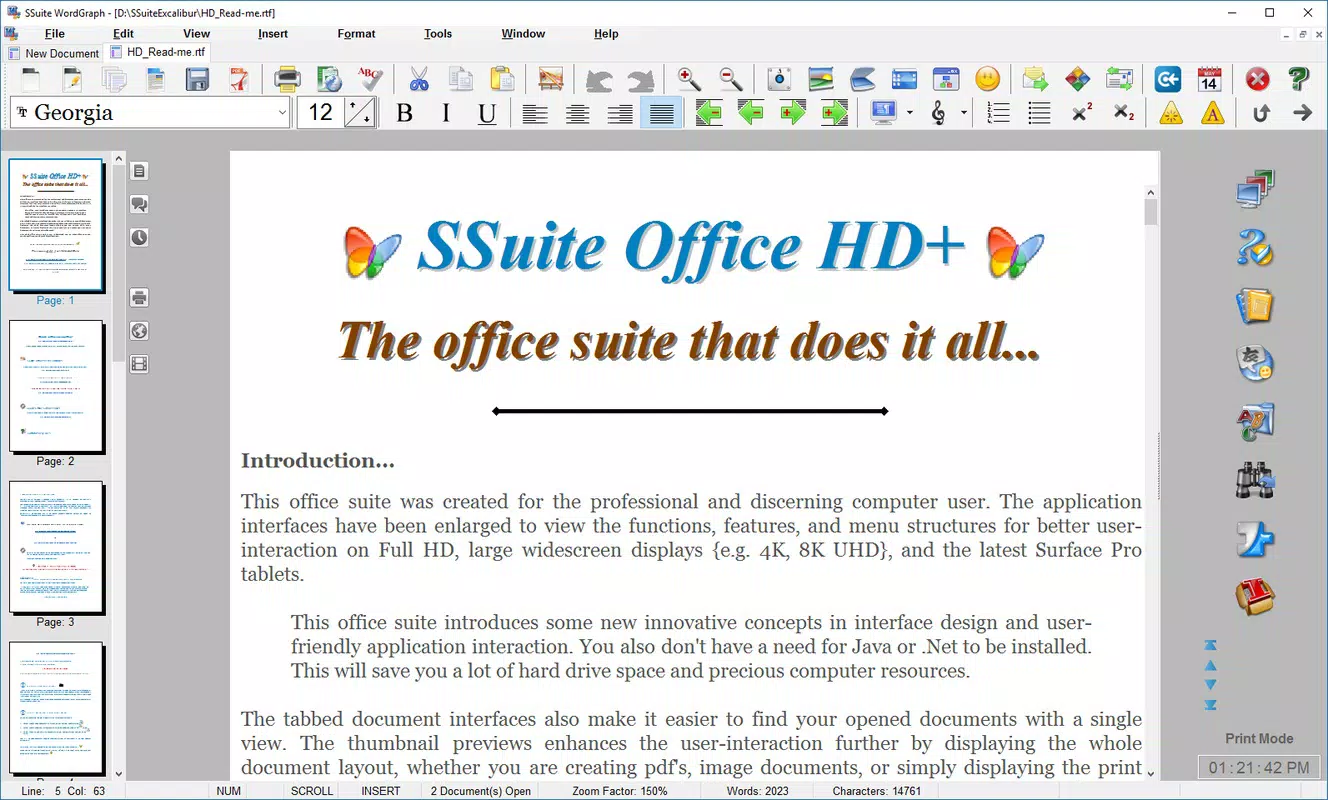
- Flexible Word Processing: SSuite WordGraph Editor offers advanced text formatting, image embedding, and automated document structuring. Users can generate tables of contents, indexes, and bibliographies without manual effort, ideal for research papers or lengthy reports.
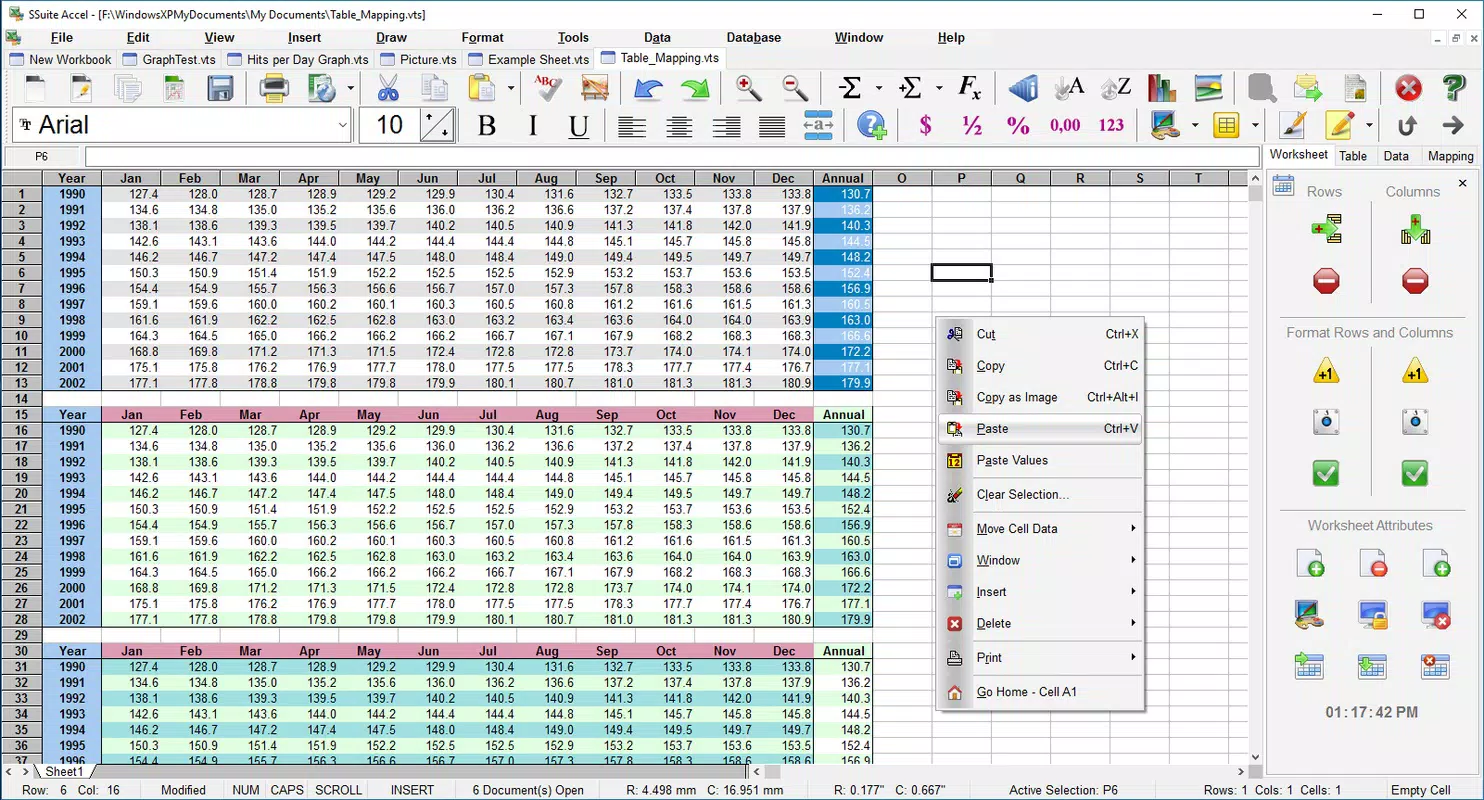
- Comprehensive Spreadsheet Tool: SSuite Accel Spreadsheet HD supports statistical analysis, custom table creation, and model recommendations tailored to user tasks. It integrates with ODBC and SQL systems, enabling database management directly within the app.
- Automatic Cloud Backups: Both the word processor and spreadsheet editor automatically save copies of user work to the cloud, safeguarding against data loss due to device issues or accidental deletions.
- High-Resolution Support: Optimized for high-definition screens, the interface delivers crisp visuals and improved readability, enhancing the user experience on modern devices.
- User-Friendly Interface: The design emphasizes intuitive navigation, with tools and functions accessible through a clean, organized layout. This reduces the learning curve and supports productivity across skill levels.
For example, a student can draft a thesis using the word processor, insert charts from the spreadsheet tool, and export the final document as a PDF—all while knowing their work is securely backed up. A small business owner can manage inventory records using the spreadsheet, generate reports, and share them in multiple formats without switching applications. These real-world use cases demonstrate how the app enhances efficiency and reduces dependency on multiple tools.
Interface, UX & Performance
The interface of SSuite Office Premium HD+ is designed with clarity and functionality in mind. The layout follows a standard ribbon-style navigation, placing key tools within easy reach. Visual elements are clean and uncluttered, minimizing distractions while maximizing focus on content creation. The app’s high-resolution support ensures that text and graphics appear sharp on modern displays, improving legibility and overall user comfort.
Navigation is straightforward, with logical grouping of features and consistent iconography. Users can switch between the word processor and spreadsheet editor seamlessly, maintaining context across tasks. Although the developer did not list formal performance metrics, the app appears optimized for responsiveness on devices with adequate processing power and memory. Stability is maintained through regular updates, and the automatic cloud backup system contributes to a sense of reliability during extended use.
Performance may vary depending on device capabilities, but the app is designed to function efficiently on a range of mobile platforms. The lack of reported crashes or freezes suggests a stable core architecture. Users can expect smooth operation when handling moderately sized documents and spreadsheets, though very large files may require more powerful hardware.
Platform Compatibility & Technical Requirements
SSuite Office Premium HD+ is available for Android and iOS platforms. The app supports the latest versions of these operating systems, ensuring compatibility with current device standards. The file size is 128 MB, which is reasonable for a full-featured office suite. Specific requirements were not listed, so users should ensure their device has sufficient storage and RAM to run the application smoothly.
The developer did not specify minimum OS requirements, nor did they detail hardware specifications such as processor speed or GPU capabilities. Compatibility information was not fully disclosed, so users are advised to check their device’s system status before installation. The app is designed to function on high-resolution displays, suggesting it is optimized for modern smartphones and tablets with advanced screens.
Pros and Cons
Pros
- Free to download and use with no in-app purchases
- Includes both word processor and spreadsheet editor in one suite
- Supports multiple export formats including PDF, DOC, ODT, JPG, and PNG
- Automatic cloud backup for data protection
- Optimized for high-resolution displays
- Intuitive interface suitable for all user skill levels
Cons
- Specific system requirements were not provided
- Developer did not disclose update frequency or release schedule
- No public information on customer support channels
- Performance on older or low-end devices is unverified
- Cloud backup system details were not disclosed
FAQ
Is SSuite Office Premium HD+ safe to install?
Yes, the app is available through official channels and does not require root access or suspicious permissions. It is designed as a secure utility for document and data management.
Can I use SSuite Office Premium HD+ offline?
Yes, the app functions fully without an internet connection. However, cloud backup features require an active connection to sync data.
Does SSuite Office Premium HD+ support file sharing?
Yes, documents and spreadsheets can be exported in multiple formats, enabling easy sharing via email, messaging apps, or cloud storage services.
Is the app updated regularly?
The developer has not publicly disclosed the update schedule. Users are advised to check for updates manually in their app store.
Can I use SSuite Office Premium HD+ on multiple devices?
Yes, since the app supports cloud backups, users can install it on multiple compatible devices and access their work across platforms.
Final Thoughts
SSuite Office Premium HD+ stands out as a powerful, free mobile solution for users who need reliable document and spreadsheet tools without the cost of premium alternatives. Its dual functionality, cloud backup system, and high-resolution optimization make it a strong choice for students, professionals, and creatives seeking a streamlined productivity experience. While some technical details remain unspecified, the app’s clean interface, robust feature set, and focus on user efficiency deliver clear value.
Those who prioritize data safety, cross-format compatibility, and a desktop-like workflow on mobile will benefit most from this tool. Whether you're preparing a report, managing data, or organizing personal projects, SSuite Office Premium HD+ provides a solid foundation for mobile productivity.
Download SSuite Office Premium HD+ now


